User Manual
UNH XTRM CLIP.
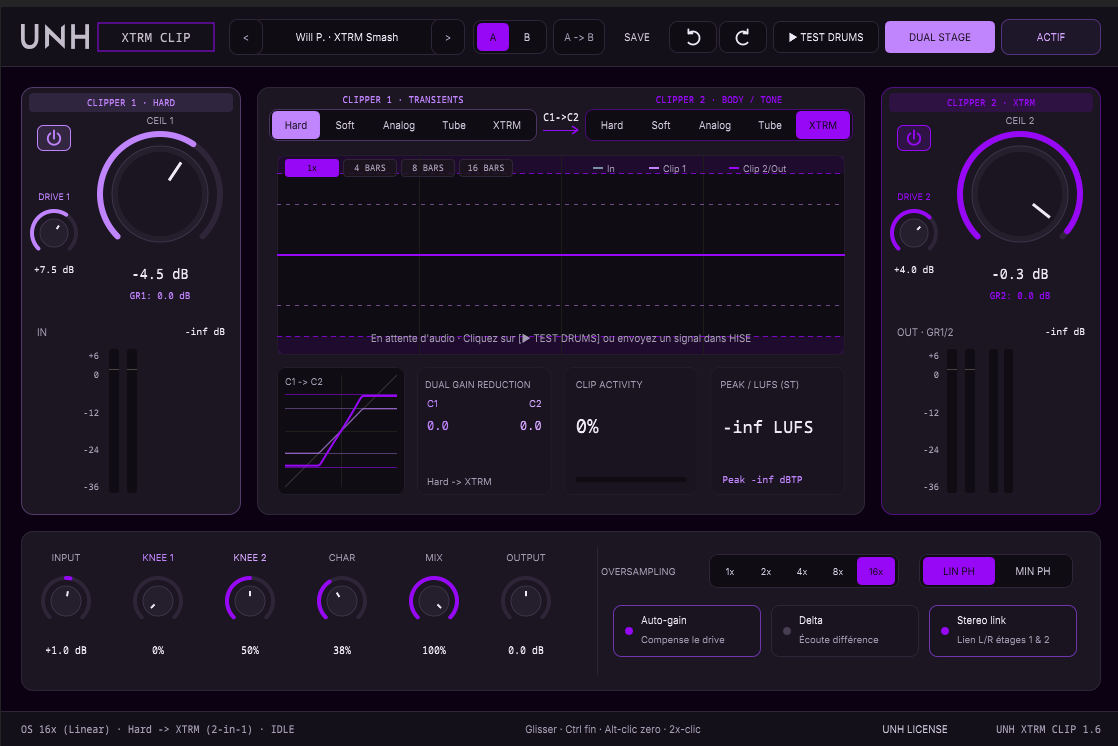
Complete workflow, signal-flow reference, control breakdown, and licensing guide for mastering the dual-stage UNH XTRM CLIP (Windows 64-bit VST3) clipper on individual tracks, drum busses, and stereo masters.
Quick Start.
- Install and insert UNH XTRM CLIP on any mono or stereo track (snare, kick, bass, vocals), drum bus, or Master bus as a Windows 64-bit VST3 plugin.
- Activate your license or 14-day free trial: on first launch inside your DAW, click ACTIVATE ONLINE (UNHUGE.COM) or load your offline
.license_x64key file. - Select Single Stage (classic one-stage clipper) or DUAL STAGE (two serial clippers C1 → C2).
- Set the final ceiling with CEILING / CEIL 2, push level into the threshold with DRIVE, shape the corner with KNEE and harmonics with CHAR, and choose your inter-sample safety via CEIL GUARD.
Signal Flow.
In Dual Stage mode, audio passes sequentially through two analytical ADAA clipping stages inside a single oversampled domain:
INPUT & OVERSAMPLING
Input trim (-12 to +12 dB) and 1x–16x oversampling (Linear or Minimum Phase).
CLIPPER 1 · TRANSIENTS
Drive 1, Curve 1, Ceil 1, Knee 1. Independently bypassable via its Power button.
CLIPPER 2 · BODY / TONE
Drive 2, Curve 2, Ceil 2, Knee 2, Character — final harmonic tone & ceiling.
MIX, OUTPUT & CEIL GUARD
Sample-aligned parallel Mix (or Delta), Output Trim, and 2-stage CEIL GUARD (Off / Sample / True Peak).
Top Bar.
| Control | Function |
|---|---|
| < Preset Name > | Step quickly through the 10 factory presets and your saved user presets. A dot (•) indicates unsaved edits. |
| A / B & A -> B | Instant toggle between two complete parameter states. A -> B (or B -> A) copies the active slot to the other slot. |
| SAVE | Opens the real-time preset manager: load, rename, save (SAVE NEW), overwrite (UPDATE), or delete (DELETE) user presets. |
| Undo / Redo | Full 64-step history (Phosphor icons) across all knobs, curves, and toggles. |
| DUAL STAGE | Enables or disables serial two-stage processing (C1 → C2). In DAW hosts, the internal bypass button mirrors host automation via the automatable Soft Bypass parameter. |
Clipper 1 (Transients) & Clipper 2 (Body).
| Parameter | Range & Taper | Role in Mixing & Mastering |
|---|---|---|
| Power (C1 / C2) | Active / Bypass | Click-free per-stage bypass for C1 or C2. Header turns amber and reads CLIPPER 1/2 · MODE - BYPASS. |
| DRIVE 1 / DRIVE | 0.0 to +12.0 dB | Clean pre-clip gain driving peaks into the threshold (zero coloration below threshold). Pair with Auto-gain for equal-loudness saturation checks. |
| CEIL 1 | -12.0 to 0.0 dB | Sets Clipper 1 threshold (quadratic high-precision scale between 0 and −3 dB). |
| DRIVE 2 | 0.0 to +6.0 dB | Focused pre-gain stage feeding Clipper 2. |
| CEIL 2 / CEILING | -12.0 to 0.0 dB | Sets the final ceiling, strictly enforced at output by CEIL GUARD. |
| KNEE 1 / KNEE 2 | 0% to 100% | Controls transition softness around each threshold (0% = sharp knee; 40–100% = smooth transition). |
Curves & CHAR Control.
- Hard: Linear analytical ADAA clipping without high-end dulling. Best on Clipper 1 for transparent transient shaving.
- Soft: Smooth cubic saturation, effortless on vocals, mix busses, and transparent masters.
- Analog: Asymmetric MOSFET curve generating rich even and odd console harmonics.
- Tube: Asymmetric push-pull triode curve reinforcing low-mid density on drums, bass, and guitars.
- XTRM: Signature C2-continuous curve blending low-end solidity (Low-Guard), harmonic grit, and surgical ceiling hold.
- CHAR (0% to 100%): Harmonic intensity control that maintains pristine transparency (≤ −145 dB THD) below threshold.
Global Controls, Oversampling & CEIL GUARD.
| Parameter | Technical Behavior |
|---|---|
| CEIL GUARD | OFF: maintains fixed 1 ms lookahead slot with zero post-decimation limiting. SAMPLE: strictly caps every output sample ≤ CEIL 2 (+ Output Trim), even at 1x. TRUE PEAK: dual cascaded 8× Kaiser detector holding inter-sample peaks ≤ CEIL 2 on musical material and HF transients. |
| INPUT / OUTPUT | Input and output gain trims (−12 to +12 dB). |
| MIX (0% to 100%) | Parallel blend sample-aligned to the exact internal oversampling latency. |
| OVERSAMPLING | Internal rate multiplier (1x to 16x) suppressing aliasing (−73 dB at 4x, −103 dB at 16x). Reported latency remains locked at 130 samples (48 kHz) across every mode. |
| LIN PH / MIN PH | LIN PH (Linear Phase): preserves exact transient/low-end phase alignment. MIN PH (Minimum Phase): eliminates pre-ringing while staying latency-aligned at 130 samples. |
| Auto-gain | Matches perceived loudness as Drive is increased. |
| Delta | Auditions the exact phase-aligned difference signal (Raw Input − Clipped Output, ≤ −159 dB null below threshold). |
| Stereo link | Links L/R detection cleanly around zero-crossings on stereo material (supports Mono instances seamlessly). |
Oscilloscope, Transfer Curve & LUFS.
- Oscilloscope: Plots input waveform (In), C1 output (Clip 1), and final output (Clip 2 / Out) with phase-locked 1x / 4 / 8 / 16 BARS zoom windows.
- TRANSFER (C1 -> C2): Live composite transfer function curve reflecting both thresholds, Knees, and Character.
- PEAK / LUFS (ST / INT): Compliant ITU-R BS.1770-4 loudness metering and post-decimation True Peak (dBTP). Left-click to toggle Short-Term / Integrated; Right-click to reset.
Mouse Shortcuts & Numeric Entry.
| Action | Behavior |
|---|---|
| Vertical Drag | Smooth rotary adjustment. |
| Ctrl + Drag | Fine adjustment down to 0.1 dB steps. |
| Alt + Click | Resets parameter to its neutral default (0.0 dB or 0%). |
| Double-Click Value | Direct keyboard entry (e.g. type -0.3 or 43 + Enter). |
The 10 Factory Presets.
Lens P. - Master
Hard (Drive 1: +1.2 dB, Ceil 1: 0.0 dB, Knee 1: 43%) into Analog (Drive 2: +1.2 dB, Ceil 2: −1.0 dB, Output +0.4 dB) with Auto-gain ON and True Peak Guard.
Master - Punch
Hard (Ceil 1: −0.6 dB) into XTRM (Ceil 2: −0.3 dB) at 16x Linear Phase and 100% Character.
Master · Transparent
Soft Single Stage at 8x Linear Phase, Knee 60%, Drive +3.0 dB, Ceiling −0.3 dB.
Bus · Dual Stage
Hard (−4.0 dB) into Analog (−1.0 dB) at 8x Linear Phase to shave peaks prior to analog fullness.
Bus · XTRM Smash
Hard (−4.5 dB) into XTRM (−0.3 dB) at 16x for heavy modern drum density.
Zoy Yokan · Drums Bus
Hard into Soft at 16x Minimum Phase with Knee 100% and Character 60% on the drum bus.
Session CPU & unhuge.com Licensing.
How to activate your license or 14-day free trial:
- Online Activation: Click ACTIVATE ONLINE (UNHUGE.COM) inside the plugin, sign in at unhuge.com/activer/ and authorize your workstation in one click.
- Offline Studio Activation: Copy your MACHINE ID, download
UNH XTRM CLIP.license_x64from My Account (or /activer/) and load it using OFFLINE KEY FILE.